
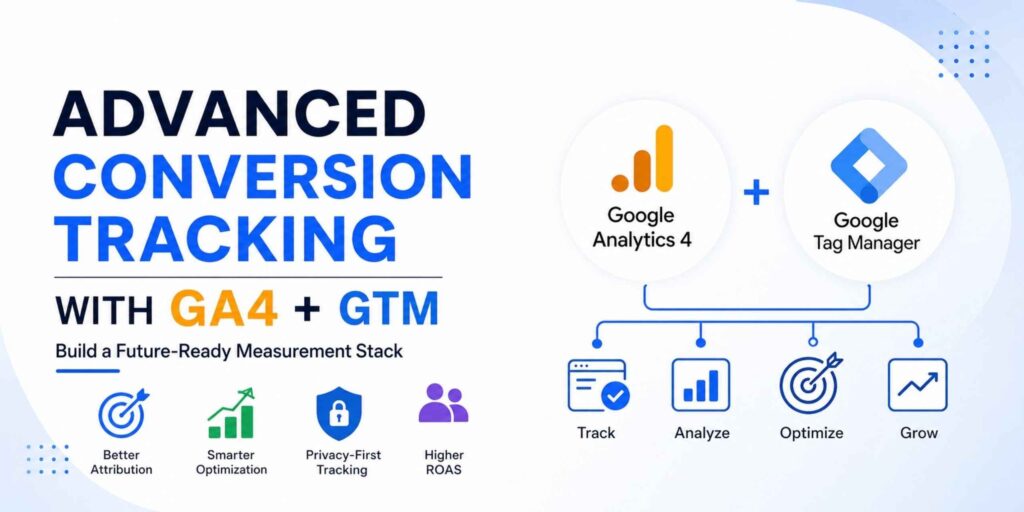
Build a Future-Ready Measurement Stack for Better Attribution, Smarter Optimization & Higher ROAS
In modern performance marketing, data is no longer just about reporting — it is the foundation of campaign profitability.
With browser privacy restrictions, cookie deprecation, ad blockers, iOS tracking limitations, and increasing signal loss across advertising platforms, traditional conversion tracking setups are becoming unreliable. If your business is still relying only on thank-you page tracking, basic Google Ads conversion tags, or standard pixels, you’re likely missing valuable conversion data — and making optimization decisions on incomplete signals.
That’s where Advanced Conversion Tracking with Google Analytics 4 (GA4) and Google Tag Manager (GTM) becomes essential.
When implemented strategically, GA4 and GTM go far beyond simple event tracking. They create a scalable measurement ecosystem that helps businesses:
- Improve attribution accuracy
- Feed cleaner data into ad platforms
- Strengthen automated bidding performance
- Recover lost signals through enhanced conversions
- Track full-funnel user journeys, not just final outcomes
- Enable server-side and privacy-first measurement strategies
For serious marketers, this is no longer optional — it’s infrastructure.
In this guide, we’ll explore how to build an advanced conversion tracking setup using GA4 + GTM, including ecommerce events, lead tracking, server-side tagging, CRM integrations, and 2026-ready measurement strategies.
What Is Advanced Conversion Tracking?
Advanced conversion tracking goes beyond measuring a single completed action like a purchase or form submission.
It captures meaningful user interactions across the full customer journey and sends enriched data for optimization and analysis.
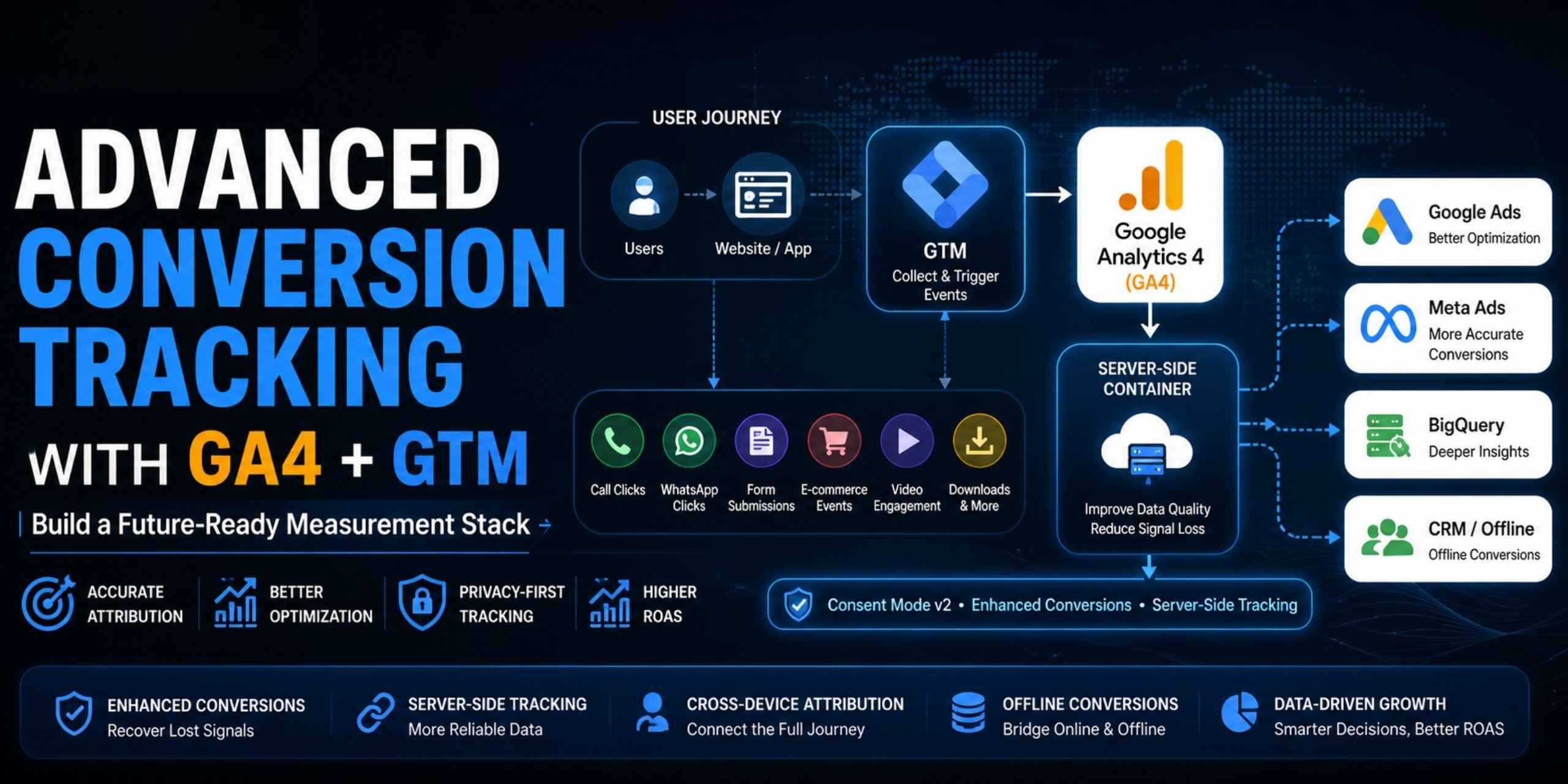
This may include tracking:
Lead Generation Events
- Form submissions
- Demo requests
- Consultation bookings
- Newsletter signups
- Qualified lead stages
Engagement Signals
- Button clicks
- Scroll depth
- Video engagement
- File downloads
- Site search usage
- Add to cart
- Begin checkout
- Purchases
- Revenue values
- Refund events
Revenue Events
Intent-Based Micro Conversions
- Phone call clicks
- WhatsApp clicks
- Live chat starts
- Pricing page visits
- Quote requests
Advanced Attribution Signals
- User identifiers (hashed first-party data)
- Offline conversions from CRM
- Cross-device conversion paths
- Server-side event forwarding
Instead of only measuring the final conversion, advanced tracking helps monitor the entire path to conversion.
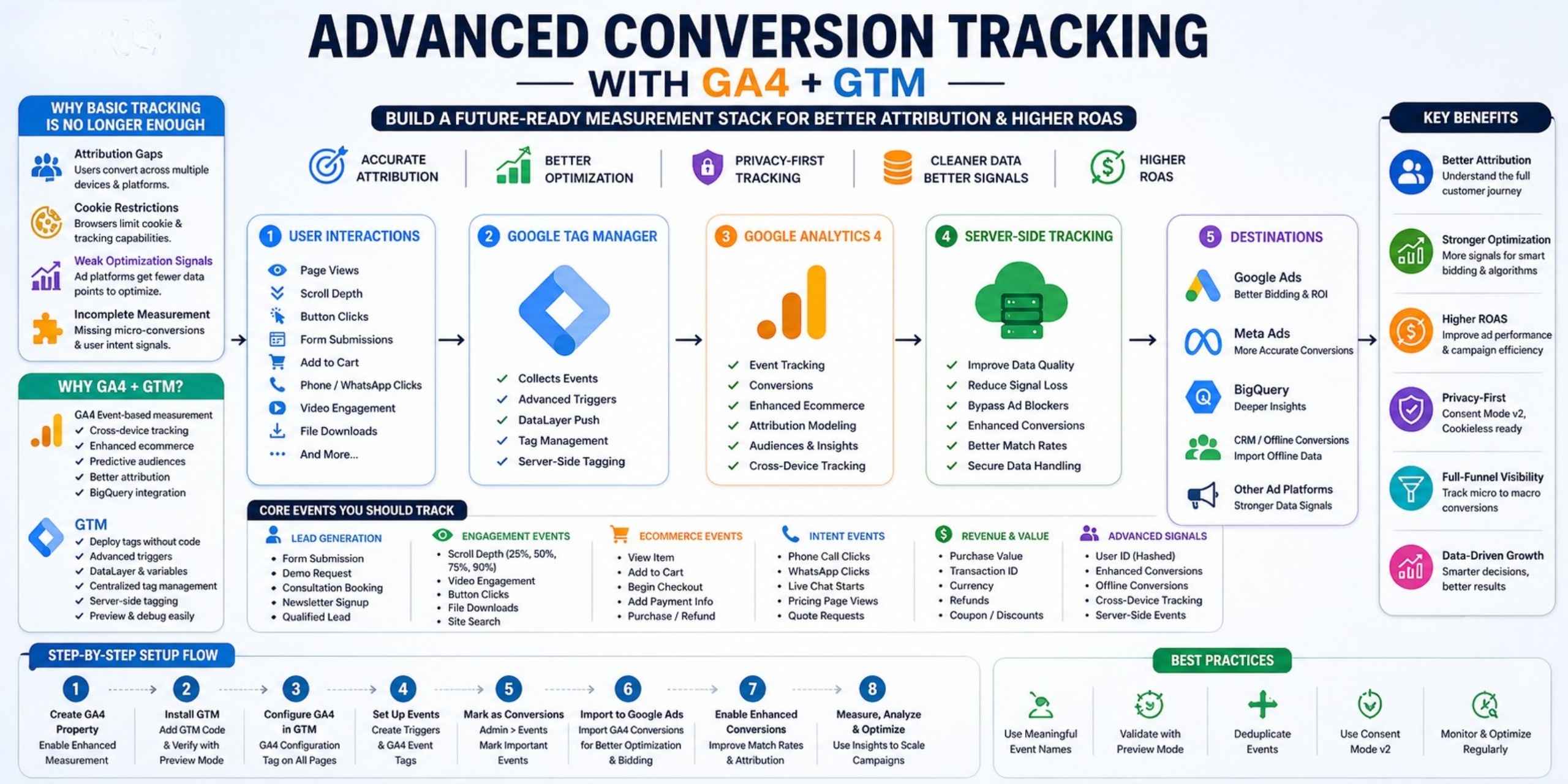
Why Basic Tracking Is No Longer Enough
Traditional tracking setups face four major problems.
1. Attribution Gaps
Users often discover a brand on one device, research on another, then convert later.
Basic last-click setups frequently fail to connect those touchpoints.
2. Cookie Restrictions and Signal Loss
Browsers like Safari and Firefox have reduced client-side tracking reliability.
Ad blockers and consent limitations create further data loss.
3. Weak Optimization Signals
Platforms like Google Ads and Meta rely on conversion signals to optimize campaigns.
If only purchases are tracked, algorithms have fewer data points to learn from.
4. Incomplete Measurement
Tracking only final conversions ignores valuable micro-conversions that indicate buying intent.
That limits optimization.
Advanced tracking solves all four
Why Use GA4 and GTM Together?
Google Analytics 4 (GA4)
GA4 uses an event-based measurement model, making it far more flexible than Universal Analytics.
Key Benefits
- Custom event tracking
- Cross-device measurement
- Predictive audiences
- Enhanced ecommerce reporting
- Data-driven attribution
- BigQuery integration
- Offline conversion imports
GA4 is no longer just analytics.
It is your central measurement layer.
Google Tag Manager (GTM)
GTM acts as your tracking control center.
GTM Benefits
- Deploy tags without code changes
- Manage all tracking centrally
- Build advanced triggers
- Push structured data via dataLayer
- Debug events with Preview Mode
- Enable server-side tagging
Together, GA4 + GTM form a powerful tracking stack.
Step-by-Step Advanced Conversion Tracking Setup
Step 1: Create Your GA4 Property
Inside Google Analytics:
- Create a GA4 property
- Add a web data stream
- Copy your Measurement ID (G-XXXXXXXXXX)
Enable Enhanced Measurement for:
- Pageviews
- Scroll tracking
- Outbound clicks
- Site search
- File downloads
- Video engagement
This provides a strong foundation before custom events are added.
Step 2: Install Google Tag Manager
If GTM isn’t installed:
Create a container and place code:
- In the <head>
- Immediately after opening <body>
Use Preview Mode to confirm proper installation.
Step 3: Configure GA4 Through GTM
In GTM:
Create:
Tag Type: GA4 Configuration
Measurement ID: Your GA4 ID
Trigger: All Pages
Publish container.
Now GA4 loads through GTM.
Step 4: Set Up Core Conversion Events
Lead Events
Recommended events:
- generate_lead
- form_submit
- book_demo
- consultation_request
Triggers can include:
- Form Submission trigger
- Thank-you page trigger
- Button click trigger
Phone Call Tracking
Track clicks on:
tel: links
Send event:
call_click
Often overlooked but highly valuable.
WhatsApp Click Tracking
Track:
whatsapp_click
Especially useful for service businesses.
Scroll Depth Tracking
Set triggers for:
- 50%
- 75%
- 90%
Use events like:
- scroll_50
- scroll_75
- scroll_90
These reveal content engagement quality.
Step 5: Implement Enhanced Ecommerce Tracking
Basic purchase tracking is not enough.
Track the full funnel:
- view_item
- add_to_cart
- begin_checkout
- add_payment_info
- purchase
Use dataLayer pushes:
dataLayer.push({
event: “purchase”,
ecommerce: {
transaction_id: “12345”,
value: 2999,
currency: “INR”
}
});
Map these into GA4 event tags.
This enables:
- ROAS measurement
- Funnel analysis
- Cart abandonment insights
- Product performance reporting
Step 6: Mark Key Events as Conversions in GA4
Go to:
Admin → Events → Mark as Conversion
Enable:
- generate_lead
- purchase
- book_demo
Now GA4 treats them as conversion actions.
Step 7: Import Conversions into Google Ads
Inside Google Ads:
Tools → Conversions → Import → GA4
Import your events.
Benefits:
- Better Smart Bidding signals
- Improved Performance Max optimization
- Stronger audience modeling
- More accurate CPA reporting
This is where tracking becomes performance growth.
Step 8: Enable Enhanced Conversions
Highly recommended.
Enhanced Conversions securely send hashed first-party data such as:
- Phone number
- Address
Benefits:
- Recover lost conversion signals
- Improve match rates
- Strengthen attribution after privacy changes
Huge impact for lead gen campaigns.
Step 9: Validate Everything
Never launch untested tracking.
Use GTM Preview Mode
Check:
- Trigger firing
- Duplicate tags
- Event parameters
- Broken triggers
Use GA4 DebugView
Verify:
- Event names
- Parameters
- Conversion flow
Bad data leads to bad decisions.
Pass Event Parameters, Not Just Events
Events without parameters limit reporting.
For Lead Tracking
Pass:
- lead_type
- form_name
- source_page
For Ecommerce
Pass:
- value
- currency
- product_id
- category
For Engagement
Pass:
- scroll_percent
- video_progress
Richer data creates richer optimization.
Advanced Layer: Server-Side GTM (Modern Gold Standard)
This is where advanced marketers are heading.
Why Server-Side Tracking Matters
Client-side tracking has blind spots.
Server-side GTM improves:
- First-party data control
- Signal durability
- Attribution quality
- Reduced browser blocking
- Faster website performance
Many mature stacks now use:
GA4 + Web GTM + Server-Side GTM + Conversion APIs
This is increasingly becoming the modern measurement standard.
Benefits of Server-Side GTM for Privacy Compliance
A major benefit often overlooked:
Server containers allow you to:
- Filter sensitive data
- Clean event payloads
- Control data routing
- Improve GDPR compliance
- Build stronger first-party infrastructure
That matters more than ever.
Add Offline Conversion Tracking (Often Missed)
One major gap in many setups:
Offline revenue attribution.
Example:
User submits a lead form.
Sales closes the deal 45 days later.
Without offline conversion imports?
Google Ads never sees revenue.
With CRM integrations (HubSpot, Salesforce, Zoho etc.) you can send offline closed-won revenue back into GA4 and ad platforms.
That closes the loop.
Move Beyond Conversion Tracking to Revenue Intelligence
Top marketers are shifting from measuring clicks to measuring profitability.
Track beyond:
Instead of CTR, watch:
- Attention quality
- Engaged sessions
- Qualified lead rate
- MER (Marketing Efficiency Ratio)
- CAC Payback
- Customer Lifetime Value (LTV)
These reveal growth efficiency.
Instead of only ROAS, watch:
Multi-Touch Attribution Matters
Last-click is outdated.
Use GA4 attribution models to understand:
- Discovery touchpoints
- Consideration touchpoints
- Closing touchpoints
This improves budget allocation.
Use Incrementality Testing (Advanced Practice)
Ask:
Would this conversion have happened without ads?
Run holdout tests to measure true lift.
This is how sophisticated advertisers validate performance.
Common Tracking Mistakes to Avoid
1. Duplicate Event Firing
by:
- Hardcoded tags + GTM firing together
- Multiple triggers firing same event
Always audit duplicates.
2. Poor Event Naming
Use GA4 conventions.
Good:
- purchase
- add_to_cart
Bad:
- purchaseeventfinal
Consistency matters.
3. Not Using Data Layer
Avoid fragile DOM scraping.
Use structured dataLayer whenever possible.
4. Tracking Too Few Micro-Conversions
Don’t track only purchases.
Feed algorithms more intent signals.
5. Ignoring Consent Mode v2
Critical in 2026.
Consent Mode helps model conversions when consent isn’t granted and supports privacy-safe measurement.
A major topic many businesses still miss.
Ideal Advanced Measurement Stack
A mature setup often includes:
✅ GA4 Event Tracking
✅ GTM Trigger Management
✅ Enhanced Ecommerce
✅ Google Ads Conversion Imports
✅ Enhanced Conversions
✅ Meta CAPI Integration
✅ Server-Side GTM
✅ Consent Mode v2
✅ Offline Conversion Imports
✅ BigQuery for Raw Data Analysis
This creates a true measurement ecosystem.
Why BigQuery Should Be Part of Your Stack
This is often skipped.
GA4 + BigQuery allows:
- Raw event-level data access
- Custom attribution models
- Predictive analysis
- LTV modeling
- Funnel diagnostics
For advanced marketers, BigQuery is a major competitive advantage.
How Better Tracking Improves Ad Performance
This isn’t just reporting.
It directly affects results.
Better tracking gives ad platforms:
- More signals
- Better audience modeling
- Stronger automated bidding
- Higher-quality optimization decisions
Often resulting in:
- Lower CPAs
- Higher ROAS
- Better attribution confidence
- More scalable campaigns
Tracking is not just analytics.
It is performance infrastructure.
Future Trends Shaping Conversion Tracking
Forward-looking marketers should watch:
1. AI-Driven Optimization Signals
Platforms increasingly prioritize modeled signals over raw click data.
Better input data powers better automation.
2. First-Party Data Strategy
Owning customer data will become even more important.
Tracking and CRM strategy are merging.
3. Conversion APIs Everywhere
Meta CAPI, Google Enhanced Conversions, server endpoints — all moving server-side.
This is the future.
Final Thoughts
As privacy changes continue reshaping digital marketing, outdated tracking setups put campaign performance at risk.
Advanced conversion tracking with GA4 + GTM gives marketers the visibility, resilience, and signal quality needed to optimize confidently.
By combining:
- Meaningful event tracking
- Enhanced conversions
- Ecommerce data layers
- Server-side GTM
- CRM integrations
- BigQuery analysis
- Multi-touch attribution
Whether you manage lead generation, ecommerce, or enterprise-scale paid media, this setup is no longer a nice-to-have.
…you transform analytics from a reporting tool into a growth engine.
It is essential.
Because better tracking doesn’t just measure performance.
It improves it.
Need Help Implementing Advanced Tracking?
If you’re looking to implement:
- GA4 Setup
- Google Tag Manager
- Server-Side GTM
- Meta Conversion API
- Enhanced Conversions
- BigQuery Analytics