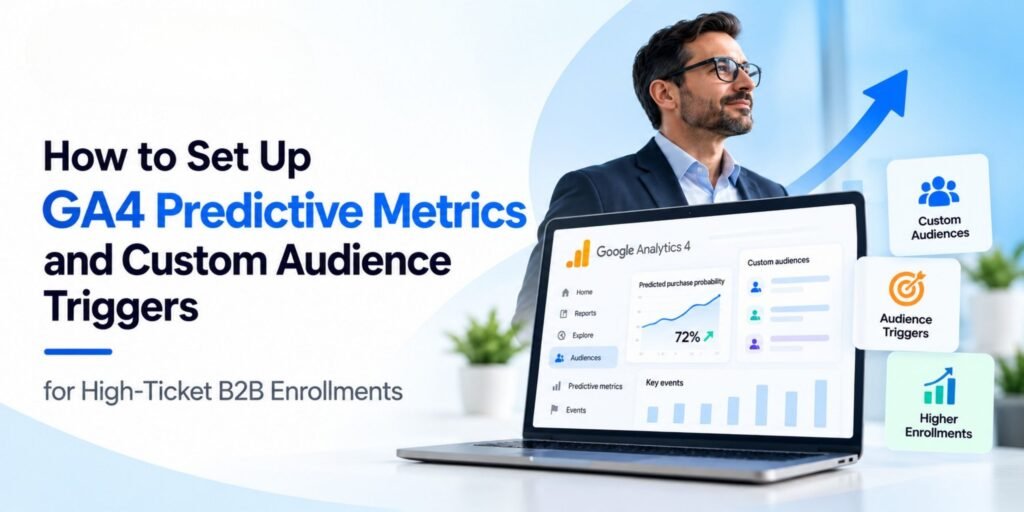
High-ticket B2B enrollments rarely happen after a single website visit. A prospective learner may explore a course page, review the curriculum, compare training providers, download a brochure, attend a webinar, and return several times before submitting an enquiry or enrolling.
For marketing teams promoting executive leadership programs, corporate training, professional certifications, and advanced digital marketing courses, understanding this journey is essential.
Google Analytics 4 (GA4) helps marketers measure user behaviour, build custom audiences, and—when the property meets the eligibility requirements—use predictive metrics to identify users who may be more likely to take specific future actions.
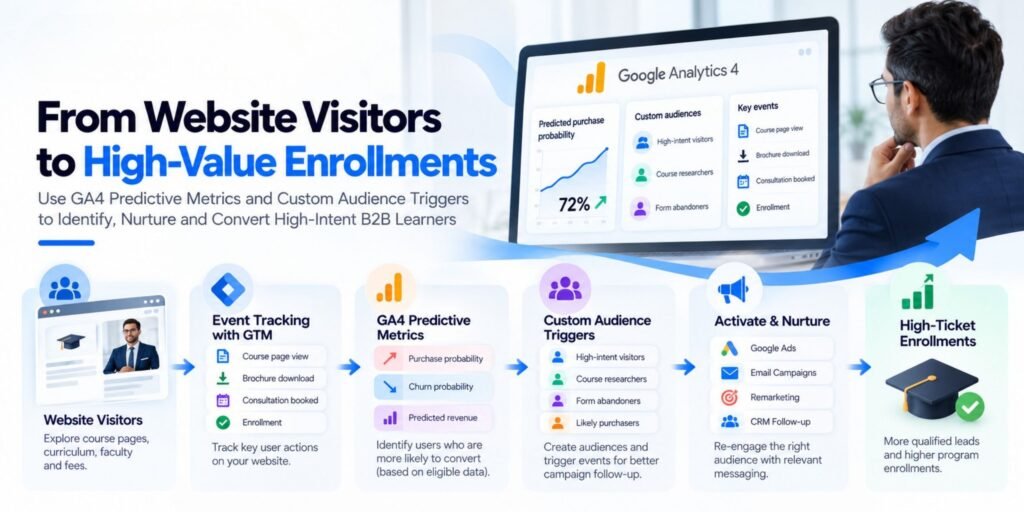
By combining GA4 event tracking, behaviour-based audiences, audience triggers, Google Tag Manager (GTM), and CRM data, businesses can create a more structured approach to identifying promising prospects and improving enrollment campaigns.
In this guide, we will explore how to configure these capabilities, how to use them for high-ticket B2B enrollments, and what marketers should know before implementing predictive audience strategies.
1. Why High-Ticket B2B Enrollment Marketing Needs Better Tracking
Marketing a high-ticket program is different from marketing an inexpensive product.
A prospective customer may need to understand the program’s value, compare alternatives, obtain approval from an employer, discuss the investment with a manager, or confirm that the training fits their career goals.
Consequently, a single conversion metric may not tell the complete story.
For example, consider a professional exploring an executive leadership program. Their journey could look like this:
- They discover the program through a Google Ads campaign.
- They visit the course landing page.
- They explore the curriculum and faculty profiles.
- They download the program brochure.
- They return a few days later to review the fees.
- They submit an enquiry.
- The sales or admissions team contacts them.
- They eventually enroll.
If your reporting only measures the final enrollment, you may miss the earlier interactions that help explain the prospect’s interest.
GA4 can help measure these interactions through events and key events, while audience definitions can group users according to their observed behaviour.
The goal is to connect marketing activity with meaningful business outcomes—not simply to generate more website traffic.
2. Understanding GA4 Predictive Metrics
GA4 predictive metrics use machine learning to estimate certain future user behaviours based on eligible historical data.
Google documents several predictive metrics, including purchase probability, churn probability, and predicted revenue. However, their availability depends on the events collected and the property’s eligibility.
Here is how the main metrics work.
Purchase probability
Purchase probability estimates the likelihood that an eligible active user will trigger a supported purchase event within the next seven days.
For a business selling a paid professional course online, this may be relevant if the enrollment process includes a properly implemented purchase event.
Important limitation: GA4’s documented purchase-probability model supports purchase-related events, not ordinary B2B lead submissions such as brochure downloads or enquiry forms. Do not assume it can predict which person will submit a lead form or enroll in a sales-assisted program.
Churn probability
Churn probability estimates the likelihood that an eligible active user will not return to the website or app within the next seven days.
For a training business, this may help explore disengagement among eligible users, but it does not directly measure whether a prospect has abandoned the enrollment process.
Predicted revenue
Predicted revenue estimates future purchase-event revenue for eligible users over a 28-day period.
This metric may be relevant to businesses collecting reliable transaction values. It should not be interpreted as a forecast of all future B2B contract revenue, pipeline value, or enrollment fees that have not been recorded as supported purchase events.
What if your business generates leads instead of online purchases?
If your enrollment process depends on enquiries, counselling calls, sales consultations, or corporate proposals, begin with behaviour-based custom audiences and accurate lead tracking.
You can still use GA4 to understand engagement and build audiences around meaningful interactions. Just distinguish these custom behavioural signals from GA4’s specific predictive purchase and revenue metrics.
3. Check Predictive Metrics Eligibility Before Building Audiences
Before designing a predictive audience, verify whether your GA4 property is eligible.
Google’s documented requirements include sufficient positive and negative examples of the relevant user behaviour. For predictive purchase or churn modelling, the requirements include at least 1,000 returning users meeting the relevant condition and at least 1,000 returning users not meeting it over the specified seven-day period within the last 28 days. Model quality must also remain sufficient. Purchase probability and predicted revenue additionally require the appropriate purchase events and transaction parameters.
How to check eligibility
- Open your GA4 property.
- Navigate to Admin → Data display → Audiences.
- Select New audience.
- Review the suggested predictive audiences.
- Check whether a relevant template is marked Ready to use or is unavailable because the property is not eligible.
The interface may show predictive audience templates as unavailable when the eligibility requirements are not met.
If your property is not eligible, do not try to manufacture predictive data by recording duplicate events or inflating engagement metrics. Instead, improve tracking quality, collect meaningful behavioural data, and use custom audiences based on observed actions.
4. Build a Measurement Framework for B2B Enrollments
Before creating audiences, define what a successful enrollment journey looks like.
A practical measurement framework separates business outcomes from the events that indicate progress toward those outcomes.
| Measurement level | Example for a high-ticket course |
| Business outcome | Paid enrollment or signed corporate training agreement |
| Primary conversion | Qualified enrollment or sales-qualified lead |
| Supporting conversion | Enquiry form submission or consultation booking |
| High-intent behaviour | Fee-page visit, curriculum engagement, brochure request |
| Early engagement | Course-page view, video engagement, webinar registration |
| Diagnostic metrics | Landing-page conversion rate, traffic source, form abandonment |
Not every interaction has equal business value. A person who spends time reviewing fees and requests a consultation may demonstrate stronger observable intent than someone who visits the homepage once.
However, these actions are indicators—not proof of buying intent. The sales or admissions team should validate lead quality.
Set up event tracking with GTM
Google Tag Manager can help deploy and manage tracking for key website interactions.
For example, you might implement the following event names:
- view_course_details — when a visitor opens a relevant course detail page.
- view_course_fees — when a visitor views the course fee section or page.
- brochure_download — when a visitor successfully downloads a brochure.
- consultation_booked — when a booking is confirmed.
- generate_lead — when a valid enquiry is submitted.
- purchase — when an actual enrollment transaction is completed and the event is implemented according to Google’s ecommerce measurement guidance.
These are proposed event names for a custom implementation, not a claim that every event is automatically collected by GA4.
Avoid treating a button click as a completed conversion. For example, track a successful form submission rather than counting every click on the submit button.
For transaction events, use the appropriate transaction identifier and accurate value and currency parameters. Test events in DebugView and verify the final reports before relying on the data.
5. Create Custom Audiences Based on High-Intent Behaviour
Custom audiences allow you to group users according to their events, dimensions, and other supported conditions. Their membership is reevaluated as GA4 receives new data.
For high-ticket enrollment campaigns, start with audiences that reflect different stages of the decision-making journey.
Audience 1: Course Researchers
Suggested name: B2B_Course_Researchers_30D
Possible inclusion conditions:
- Viewed a relevant course detail page.
- Engaged with curriculum or faculty content.
- Returned to the website during the defined membership period.
Marketing application: Use this audience to deliver educational content, course comparisons, or information about the program’s learning outcomes.
Audience 2: High-Intent Course Visitors
Suggested name: B2B_High_Intent_Visitors_30D
Possible inclusion conditions:
- Viewed course fees.
- Requested a brochure.
- Visited the admissions or consultation page.
You can use these conditions together where appropriate, or create separate audiences to compare behaviour.
Marketing application: Present relevant information about program structure, practical learning, faculty experience, corporate benefits, or consultation options.
Do not automatically label every member a qualified lead. Qualification requires additional information and validation.
Audience 3: Enquiry Starters Who Did Not Submit
Suggested name: B2B_Form_Abandoners_14D
Possible inclusion conditions:
- Started the enquiry form.
- Did not trigger the successful lead-submission event within the defined period.
This audience requires reliable form-start and form-success events. If you cannot observe form starts accurately, use a suitable alternative, such as visitors to the enquiry page who did not submit a lead.
Marketing application: Review the form experience, improve clarity, and consider appropriate follow-up where consent and available contact information permit it.
Audience 4: Existing Leads Who Have Not Enrolled
Suggested name: B2B_Leads_Not_Enrolled_60D
Possible inclusion conditions:
- Submitted a valid enquiry.
- Have not completed the recorded enrollment event.
For a sales-assisted B2B process, this audience may need CRM integration or carefully maintained exclusion rules. GA4 may not independently know whether an offline enrollment or corporate agreement was completed.
Marketing application: Share relevant program information or re-engagement campaigns, while excluding people who have already enrolled and respecting consent and advertising policies.
Audience 5: Predictive Purchasers
Suggested name: GA4_Likely_7D_Purchasers
Create this audience only if the property is eligible for GA4 purchase-probability modelling.
In the audience builder, select an eligible predictive template and review its conditions before saving. Google provides a documented workflow for creating a likely seven-day purchasers audience.
For a high-ticket training provider, this audience should be used only when the tracked purchase represents the intended transaction and the model is suitable for the business. It is not a substitute for a B2B lead qualification model.
6. How to Configure Custom Audience Triggers in GA4
An audience trigger can generate an event when a user becomes part of a specified audience or, when configured accordingly, when their audience membership is refreshed.
This is useful when you want to identify a meaningful audience transition through an event that can be analysed in reporting or used in an appropriate downstream workflow.
Audience triggers are different from standard event creation. They are processed during GA4 data processing, rather than being generated on the user’s browser before the data is sent. GA4 also documents limits on the number of audience triggers available per property.
Example: Trigger an event for high-intent course visitors
Suppose you have created a custom audience containing visitors who have viewed the course fees or requested a brochure.
You could configure an audience trigger for this audience.
Implementation steps:
- Open GA4 and navigate to Admin → Data display → Audiences.
- Create a new audience or open the audience-building workflow.
- Define the required behavioural conditions.
- In the audience trigger section, select the option to create a new event.
- Give the event a descriptive name, such as high_intent_audience_entry.
- Review whether the option to create an additional event when membership refreshes is appropriate.
- Save the audience and validate the resulting event in GA4 reporting after processing.
The exact options depend on the audience configuration and the current GA4 interface.
Important: Do not use an audience-trigger event as a condition for defining that same audience. Google documents that audience-trigger events cannot be used as the basis for audience conditions.
What can the trigger help you do?
It can provide a measurable signal that a user met your audience definition. This may help with reporting and selected downstream workflows.
However, an audience trigger does not automatically send a WhatsApp message, assign a sales representative, or launch a CRM follow-up. Those actions require a separate integration or automation workflow, appropriate consent, and reliable identity matching.
7. Connect GA4 Audiences to Google Ads
Once your audiences are configured, you can consider activating them in linked advertising platforms.
For Google Ads activation, review the account linking, personalized advertising settings, and relevant data-collection requirements. Google identifies Google Signals and/or user-provided data collection, along with linking GA4 and Google Ads and enabling personalized advertising, as relevant prerequisites for using predictive audiences in Google Ads.
A practical campaign structure could include:
- Awareness: Reach relevant professional audiences with useful educational content.
- Consideration: Re-engage eligible course researchers with curriculum, outcomes, or faculty information.
- High intent: Deliver suitable messages to visitors who explored fees or requested a brochure.
- Conversion: Encourage eligible prospects to book a consultation or complete enrollment.
- Exclusion: Remove enrolled users from acquisition or enrollment campaigns when the available data supports reliable exclusion.
Use appropriate audience sizes, campaign objectives, consent settings, and platform policies. Audience membership alone does not guarantee that Google Ads will serve an ad or that a campaign will achieve a particular conversion rate.
For B2B programs, do not assume that GA4 behavioural audiences contain verified company size, job title, purchasing authority, or professional seniority. Those attributes may require separate, appropriately collected CRM or advertising data.
8. Connect GA4, GTM, and CRM Data for Better Lead Quality
GA4 helps explain website behaviour. A CRM helps track the sales process. GTM helps manage measurement tags. These systems are complementary, not interchangeable.
Consider a prospective customer who requests information about an executive leadership program.
The website records a successful enquiry. GA4 records the event and relevant campaign information. The CRM stores the lead, tracks the follow-up, and records whether the person qualifies for the program. Later, the business can compare marketing sources against qualified leads and actual enrollments.
A practical workflow looks like this:
Google Ads → Landing Page → GTM → GA4 → CRM → Qualified Lead → Enrollment
For example, you could evaluate:
- Which channels generate the most qualified leads?
- Which course pages contribute to consultation bookings?
- Which campaigns generate enquiries that progress to enrollment?
- Where do prospects stop progressing through the sales journey?
- Which lead sources produce acceptable acquisition costs?
If you send offline outcomes back to advertising platforms, establish consistent identifiers, consent handling, and data-quality checks. Do not send unnecessary personal information to GA4 or place personally identifiable information in event names or parameters.
9. Add AI and Marketing Automation Carefully
Once your measurement and audience definitions are reliable, AI and automation tools can help teams interpret results and manage repetitive workflows.
For example, a workflow built with n8n or Make could process a valid lead submission, check the relevant CRM record, notify the admissions team, and create a follow-up task.
AI tools such as ChatGPT, Claude, or Gemini can assist with tasks such as:
- Summarising campaign performance.
- Drafting audience-specific email variations.
- Analysing anonymised or appropriately protected lead-quality trends.
- Generating hypotheses about conversion drop-offs.
- Creating reporting summaries for marketing and sales teams.
A workflow might look like this:
GA4 / CRM Data → Quality Checks → AI-Assisted Analysis → Human Review → Follow-Up Action
Keep human oversight in place. AI-generated explanations are hypotheses to validate, not proof of why a campaign performed well or poorly.
Do not give an AI system unrestricted access to personal or sensitive prospect data. Apply role-based permissions, data minimisation, and your organisation’s privacy requirements.
10. Common Mistakes to Avoid
Mistake 1: Treating predictive metrics as a universal lead-scoring model
GA4 purchase probability is designed around supported purchase events. It does not automatically predict which B2B enquiry will become a qualified lead.
Better approach: Use behaviour-based audiences for lead-generation journeys and CRM-based qualification for sales outcomes.
Mistake 2: Tracking every interaction as a conversion
A page view, button click, brochure download, qualified lead, and completed enrollment do not have the same business value.
Better approach: Define primary and supporting conversions separately.
Mistake 3: Creating audiences before validating events
If your tracking is duplicated, incomplete, or firing at the wrong point, audience membership will also be unreliable.
Better approach: Test events in GTM Preview and GA4 DebugView, and verify successful conversions before building audience rules.
Mistake 4: Assuming an audience trigger is a complete automation system
An audience trigger creates an event within GA4. It does not, by itself, perform the sales follow-up.
Better approach: Connect the relevant systems through a properly configured integration, and test the complete workflow.
Mistake 5: Ignoring enrollment quality
A campaign can generate many leads but still perform poorly if those leads are not relevant or do not progress through the sales process.
Better approach: Measure qualified leads, consultation bookings, enrollments, and acquisition costs alongside lead volume.
Mistake 6: Ignoring consent and data governance
Audience activation and data sharing must follow applicable privacy requirements and the policies of the relevant platforms.
Better approach: Review consent management, advertising settings, data retention, access permissions, and the information shared with third-party tools.
11. A Practical Implementation Roadmap
Use this sequence to implement a more reliable measurement system for high-ticket B2B enrollment campaigns.
Phase 1: Measurement foundations
- Audit GTM and GA4 configuration.
- Define the enrollment funnel.
- Implement and test key events.
- Verify enquiry and transaction tracking.
Phase 2: Behaviour-based audiences
- Create course-researcher audiences.
- Build high-intent visitor segments.
- Define form-abandonment audiences where tracking supports them.
- Exclude completed enrollments where possible.
Phase 3: Predictive eligibility
- Check whether GA4 predictive metrics are available.
- Confirm the relevant purchase events and parameters.
- Build predictive audiences only when eligible.
- Keep predictive purchase probability separate from B2B lead qualification.
Phase 4: Activation and automation
- Link GA4 with relevant advertising accounts.
- Validate audience activation requirements.
- Connect lead records to the CRM.
- Automate notifications and follow-up tasks where appropriate.
Phase 5: Performance review
- Compare campaign sources against qualified leads and enrollments.
- Review audience quality and campaign performance.
- Test messaging and landing-page improvements.
- Document what changed and whether the change improved business outcomes.
Conclusion: Use GA4 to Understand Behaviour, Not Guess at Intent
High-ticket B2B enrollment marketing requires more than generating traffic or collecting form submissions. It requires reliable tracking, meaningful audience definitions, appropriate follow-up, and a clear connection between marketing activity and business outcomes.
GA4 predictive metrics can provide useful future-behaviour estimates when the property meets the relevant eligibility requirements. Custom audiences can help group visitors according to their observed actions, while audience triggers can provide additional events when users enter or refresh audience membership.
When these capabilities are combined with GTM, Google Ads, CRM data, and carefully governed AI-assisted workflows, marketing teams can build a more measurable enrollment journey.
The most important principle is simple: track meaningful behaviour, distinguish predictions from verified lead quality, and optimise for qualified enrollments—not just clicks or leads.
For marketers looking to build these capabilities, practical knowledge of GA4, GTM, conversion tracking, audience strategy, and marketing automation is an important foundation for data-driven performance marketing.Explore practical digital marketing and performance marketing training with IILD Services:https://iild.in/