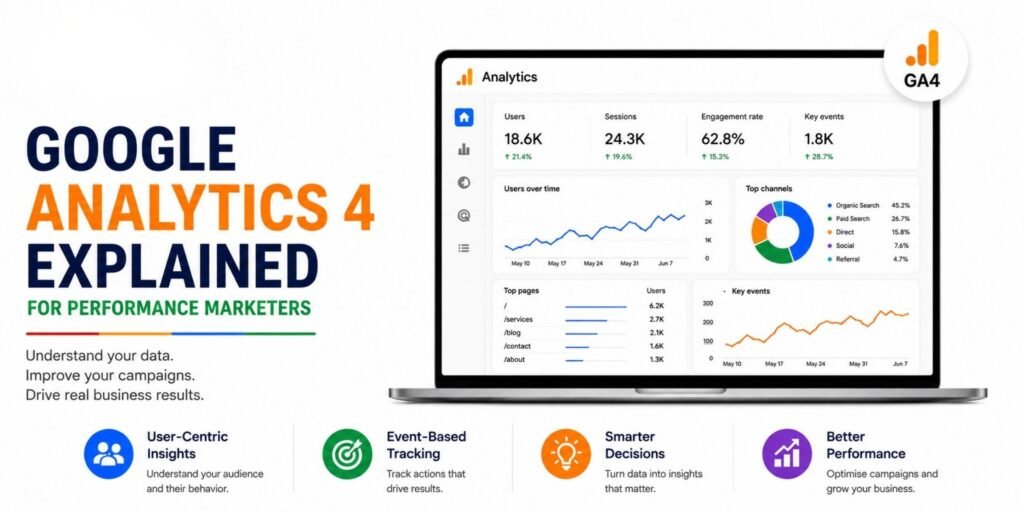
Google Analytics 4 (GA4) is more than a traffic-reporting tool. For performance marketers, it can connect user behaviour, campaign traffic, engagement, and important business actions to help answer a more useful question:
What happened, why did it happen, and what should we optimise next?
If you are running Google Ads, Meta Ads, SEO, landing-page campaigns, or lead-generation campaigns, understanding GA4 is essential for turning marketing data into decisions.
What Is Google Analytics 4?
Google Analytics 4 is Google’s analytics platform for measuring interactions across websites and apps.
Unlike a simple page-visit counter, GA4 is built around events. Events represent actions users take, such as viewing a page, clicking a link, submitting a form, watching a video, or completing a purchase.
GA4 can also use event parameters and custom dimensions or metrics to provide additional context about those actions.
For performance marketers, this means GA4 can help connect:
Traffic → User Behaviour → Engagement → Key Events → Business Outcomes
Why GA4 Matters for Performance Marketing
Performance marketing is not simply about generating traffic.
You need to know whether that traffic is:
- Engaging with your website
- Reaching important pages
- Submitting forms
- Adding products to carts
- Completing purchases
- Coming from profitable channels
- Contributing to meaningful business outcomes
For example, 10,000 website visits may look impressive. But if only a small percentage of visitors take a meaningful action, traffic volume alone doesn’t tell you whether the campaign is working.
GA4 helps marketers move from “How much traffic did we get?” to “What did users actually do?”
Understanding the GA4 Data Model
One of the biggest differences for marketers moving to GA4 is its event-based approach.
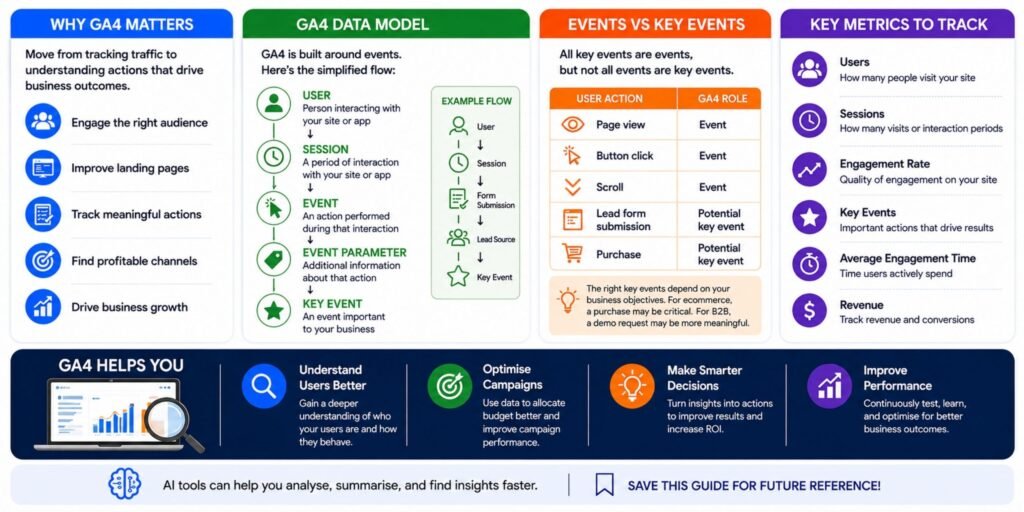
A simplified model looks like this:
User
The person interacting with your website or app.
↓
Session
A period of interaction with your website or app.
↓
Event
An action performed during that interaction.
↓
Event Parameter
Additional information about that action.
↓
Key Event
An event that is particularly important to your business.
For example:
User → Session → Form Submission → Lead Source → Key Event
This structure gives marketers more flexibility when analysing user behaviour.
What Are GA4 Events?
Events measure actions users take on your website or app.
Examples include:
- page_view
- scroll
- click
- form_submit
- add_to_cart
- purchase
- Video interactions
- Custom business actions
GA4’s Events report can contain automatically collected events, enhanced measurement events, recommended events, and custom events.
Why Events Matter
Imagine you are running a lead-generation campaign.
You don’t only want to know:
“How many people visited the landing page?”
You also want to know:
“How many people submitted the form?”
That second action can be much more valuable for evaluating campaign performance.
Events vs Key Events
This distinction is important.
An event measures something that happened.
A key event identifies an action that is particularly important to your business.
Any collected event can be marked as a key event in GA4.
For example:
| User Action | GA4 Role |
| Page view | Event |
| Button click | Event |
| Scroll | Event |
| Lead form submission | Potential key event |
| Purchase | Potential key event |
The right key events depend on your business objectives.
For an ecommerce company, a purchase may be critical.
For a B2B company, a qualified enquiry or demo request may be more meaningful.
Sessions and Engagement in GA4
A session represents a period of interaction with your website or app. By default, a session ends after 30 minutes of inactivity, although the timeout can be adjusted.
But sessions alone aren’t enough.
GA4 also measures engaged sessions.
An engaged session is one that:
- Lasts longer than 10 seconds, or
- Includes a key event, or
- Includes at least two page or screen views.
This is useful because a campaign generating thousands of sessions may not necessarily be generating meaningful engagement.
Engagement Rate vs Bounce Rate
GA4 defines engagement rate as the percentage of sessions that were engaged sessions.
The bounce rate is the inverse of engagement rate.
For marketers, this gives you another way to evaluate traffic quality.
For example:
Campaign A
10,000 sessions
High engagement
Strong key-event rate
Campaign B
10,000 sessions
Low engagement
Very few key events
Both campaigns generated the same traffic volume.
But they clearly aren’t delivering the same marketing value.
The Metrics Performance Marketers Should Watch
Don’t build your reporting around every metric available in GA4.
Start with metrics that connect directly to your objectives.
1. Users
Users help you understand the number of people interacting with your website or app.
GA4 distinguishes between total users, active users, new users, and returning users.
2. Sessions
Sessions help you understand how many visits or interaction periods your website generated.
3. Engagement Rate
This helps evaluate whether sessions resulted in meaningful engagement.
4. Event Count
Event count shows how often users triggered specific events.
5. Key Events
These help you measure important business actions.
6. Average Engagement Time
This helps you understand how much time users actively spent engaging with your website or app.
7. Revenue
For ecommerce businesses, revenue and purchase-related metrics are essential for evaluating commercial performance.
GA4 for Campaign Analysis
One of the most valuable applications of GA4 is understanding where your users are coming from.
The Traffic acquisition report provides cross-channel traffic-source dimensions, including session campaign and default channel grouping.
This allows marketers to investigate questions such as:
- Which channels generate the most traffic?
- Which campaigns generate engaged sessions?
- Which sources generate key events?
- Which campaigns generate revenue?
- Which landing pages perform best?
- Where are users dropping off?
Instead of looking only at clicks and impressions, you can investigate what happens after the click.
GA4 and Google Ads
When GA4 and Google Ads are properly connected, marketers can use analytics data to better understand the relationship between advertising traffic and user behaviour.
For example, you might discover:
Campaign A
- High clicks
- High traffic
- Low engagement
- Few key events
Campaign B
- Lower traffic
- Strong engagement
- More key events
- Better business outcome
This changes the optimisation conversation.
The campaign with the most clicks isn’t automatically the campaign you should scale.
GA4 for Landing-Page Optimisation
GA4 can also support landing-page analysis.
Suppose a paid campaign sends users to three landing pages.
| Landing Page | Users | Engagement | Key Events |
| Page A | High | Low | Low |
| Page B | Medium | High | High |
| Page C | High | Medium | Medium |
Page A may have excellent traffic but weak post-click performance.
Page B may deserve more attention because users are engaging and taking important actions.
This is where analytics becomes useful for CRO and performance optimisation.
Custom Dimensions and Metrics
Sometimes the standard GA4 reports don’t contain enough information for your business.
That’s where custom dimensions and metrics can help.
Google Analytics allows marketers to analyse additional custom data collected from websites or apps. Event parameters and user properties can provide additional context that can then be used in reporting.
For example, a business might want to analyse:
- Lead type
- Product category
- Customer segment
- Form type
- Subscription tier
- Content category
The important principle is simple:
Don’t collect custom data just because you can.
Collect data because it supports a decision.
GA4 Reporting for Management
A common mistake is creating reports full of numbers but short on meaning.
A management-ready GA4 report should answer three questions:
What changed?
Example:
Organic traffic increased 18%.
Why does it matter?
Example:
The increase was accompanied by stronger engagement and more key events.
What should we do?
Example:
Prioritise the pages and search themes contributing to the increase.
This is far more useful than simply sending a spreadsheet containing dozens of metrics.
Where AI Fits Into GA4 Analysis
AI can make analytics workflows faster, but it doesn’t replace analytics fundamentals.
Tools such as ChatGPT, Gemini, Microsoft Copilot, Claude, or AI-enabled reporting workflows can assist marketers with tasks such as:
- Summarising GA4 reports
- Identifying unusual changes
- Comparing reporting periods
- Generating reporting narratives
- Turning tables into management summaries
- Suggesting questions for deeper analysis
- Helping structure dashboards
- Supporting repetitive reporting workflows
For example, instead of presenting:
Users ↑ 18%
Sessions ↑ 21%
Key events ↑ 12%
an AI-assisted workflow could help turn the data into a concise management summary:
“Traffic increased during the reporting period, while key events also improved. Investigate which channels and landing pages contributed most to the increase before reallocating budget.”
The critical distinction is that AI can accelerate interpretation, but marketers still need to validate the data and business context.
GA4 + AI: A Practical Workflow
A useful workflow can look like this:
GA4 Data
↓
Clean & Validate
↓
Identify Important Changes
↓
Ask Why
↓
Generate Insights with AI
↓
Recommend Actions
↓
Test & Measure
This turns analytics from a reporting exercise into a continuous optimisation process.
Common GA4 Mistakes Performance Marketers Make
1. Focusing Only on Traffic
More traffic doesn’t automatically mean better performance.
Look at engagement and key events alongside acquisition.
2. Tracking Everything Without Priorities
A website can generate hundreds of events.
That doesn’t mean every event deserves equal attention.
3. Ignoring Data Quality
Poor tagging, inconsistent naming, missing parameters, or incorrect event implementation can undermine your analysis.
4. Reporting Numbers Without Context
A percentage increase isn’t an insight by itself.
You need to understand what changed and why.
5. Optimising for the Wrong Metric
High CTR, low CPC, or high traffic may look positive while business outcomes remain weak.
6. Treating AI Output as Fact
AI-generated summaries should be checked against the underlying GA4 data.
AI can help interpret information, but incorrect inputs can produce misleading conclusions.
How Performance Marketers Should Use GA4
A practical GA4 workflow can follow these five steps:
Step 1: Define the Business Objective
Start with the outcome you care about.
Leads? Sales? Revenue? Engagement?
Step 2: Identify the Important User Actions
Determine which events represent meaningful behaviour.
Step 3: Configure Key Events
Mark the events that matter most to your business.
Step 4: Connect Marketing Data
Analyse traffic sources, campaigns, landing pages and user behaviour together.
Step 5: Turn Data Into Actions
Use the findings to improve:
Campaigns → Landing Pages → Content → Budget → Conversion Rate
Final Thoughts
Google Analytics 4 should not be treated as a dashboard you open once a month to download numbers.
For performance marketers, its real value comes from connecting marketing activity with user behaviour and business outcomes.
The goal isn’t to collect more data.
The goal is to make better marketing decisions from the right data.
And as AI becomes increasingly useful for summarisation, anomaly detection, reporting and analysis, marketers who understand GA4 fundamentals will be in a much stronger position to use those tools effectively.
Data tells you what happened.
Analysis helps explain why.
Optimisation turns that learning into performance.
Want to Learn GA4 for Performance Marketing?
If you’re building campaigns, managing analytics, working with Google Ads, or responsible for marketing reporting, learning GA4 alongside GTM, DataLayer, Looker Studio, Excel, and AI tools can help you build a more complete measurement workflow.
Learn the data. Understand the behaviour. Optimise the performance.Sources: Google Analytics documentation on events, key events, metrics, sessions, engagement, traffic acquisition, and custom dimensions.