

Introduction
Performance marketing is often associated with Google Ads, Meta Ads, campaign budgets, targeting and creative testing.
These skills are important, but they are not enough.
A marketer may know how to launch a campaign, write ad copy and adjust bids. However, if they cannot explain where conversions come from, whether tracking is accurate or which campaigns generate valuable customers, their decisions will remain incomplete.
This is why Google Tag Manager (GTM) and Google Analytics 4 (GA4) have become career-critical skills for performance marketers.
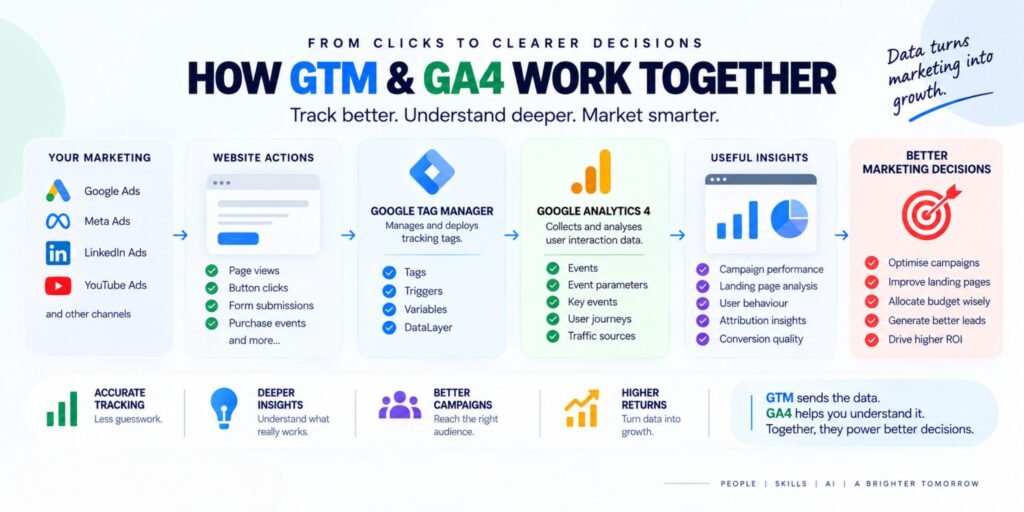
GTM helps marketers manage and deploy tracking tags. GA4 helps them understand user behaviour, campaign performance and important website actions.
Together, they create the measurement foundation required for better advertising decisions.
Without reliable tracking, performance marketing becomes guesswork.
What Is Google Tag Manager?
Google Tag Manager, commonly called GTM, is a tag-management system that allows marketers to add and manage tracking codes without repeatedly editing a website’s source code.
A tag can be used to send information to tools such as:
- Google Analytics 4
- Google Ads
- Meta Ads
- LinkedIn Ads
- Remarketing platforms
- Conversion-tracking systems
- Other marketing and analytics tools
Instead of asking a developer to manually add every tracking code, a marketer can use GTM to organise and manage many tracking requirements from one interface.
Example
A business wants to track when a visitor submits a lead form.
The tracking process may look like this:
Website Form Submission
↓
GTM Detects the Event
↓
GA4 Receives the Event
↓
Google Ads or Meta Ads Receives Conversion Data
↓
Marketer Evaluates Campaign Quality
This process allows advertising platforms and analytics tools to receive information about important user actions.
What Is Google Analytics 4?
Google Analytics 4, or GA4, is an analytics platform that measures how users interact with websites and applications.
Unlike older analytics approaches that focused heavily on sessions and pageviews, GA4 uses an event-based measurement model.
An event represents an action taken by a user, such as:
- Viewing a page
- Clicking a button
- Watching a video
- Submitting a form
- Downloading a file
- Adding a product to a cart
- Completing a purchase
Each event can include additional information, called parameters.
For example, a button-click event may include:
- Button name
- Page location
- User device
- Traffic source
- Campaign name
This allows marketers to move beyond basic traffic reporting and understand what users actually do.
GTM and GA4: What Is the Difference?
GTM and GA4 are connected, but they perform different jobs.
| Tool | Main Purpose |
| Google Tag Manager | Manages and deploys tracking tags |
| Google Analytics 4 | Collects and analyses user interaction data |
| Google Ads | Uses conversion signals for advertising and optimisation |
| Meta Ads | Uses conversion signals for campaign measurement and delivery |
| Looker Studio | Converts data into dashboards and reports |
A simple way to understand the difference is:
GTM helps send the data. GA4 helps understand the data.
GTM is not an analytics reporting platform, and GA4 does not replace a tag-management system.
Why Performance Marketers Need GTM and GA4
1. Campaign Optimisation Depends on Accurate Conversion Data
Performance marketers make decisions based on conversions.
These conversions may include:
- Lead form submissions
- Phone-call clicks
- WhatsApp enquiries
- Product purchases
- Demo bookings
- Application submissions
- Newsletter sign-ups
If these actions are not tracked correctly, campaign optimisation becomes unreliable.
For example, a Google Ads campaign may appear to generate 100 leads. But after checking the CRM, the business may discover that:
- 20 leads were duplicates
- 15 leads were spam
- 10 leads were incorrectly attributed
- 25 leads never responded
- Only 30 leads were genuinely qualified
Without proper tracking and lead-quality analysis, a marketer may continue increasing the budget on a campaign that is not producing valuable business results.
2. GTM Helps Create a More Organised Tracking System
A website may require several tracking tools.
For example:
- GA4 tracking
- Google Ads conversion tracking
- Meta Pixel
- LinkedIn Insight Tag
- Remarketing tags
- Consent-management tags
- Custom event tracking
Managing these individually through website code can become difficult.
GTM provides a central place to manage:
- Tags
- Triggers
- Variables
- Firing rules
- Tracking configurations
- Preview and debugging
This improves organisation and reduces the need for repeated code changes.
However, GTM does not automatically guarantee correct tracking. The marketer still needs to understand what should be tracked and when each tag should fire.
3. GA4 Helps Marketers Understand the Customer Journey
A click is not a conversion.
A conversion is not always a qualified lead.
A qualified lead is not always a paying customer.
GA4 helps marketers examine the journey between these stages.
For example:
Ad Click
↓
Landing Page Visit
↓
Content Engagement
↓
Form Submission
↓
Sales Follow-up
↓
Customer Conversion
A performance marketer can use GA4 to investigate:
- Which campaigns bring engaged users?
- Which landing pages perform better?
- Which traffic sources generate key events?
- Where do users drop off?
- Which devices have lower conversion rates?
- Which pages assist the conversion journey?
This creates a more complete view of campaign performance.
4. GTM and GA4 Improve Marketing Accountability
Many marketing reports focus on surface-level metrics such as:
- Impressions
- Reach
- Clicks
- CTR
- Video views
These metrics are useful, but they do not always explain business impact.
A stronger report connects marketing activity with outcomes.
For example:
| Metric | What It Shows |
| Clicks | Traffic generated |
| Engagement rate | User interaction quality |
| Form submissions | Lead actions |
| Key events | Important business actions |
| Qualified leads | Sales potential |
| Cost per qualified lead | Acquisition efficiency |
| Revenue | Business value |
GTM helps capture important actions, while GA4 helps organise and analyse them.
This allows marketers to explain not only what happened, but also why it matters.
5. Tracking Skills Help Marketers Troubleshoot Campaign Problems
Not every campaign problem is caused by poor targeting or weak creative.
Sometimes the problem is measurement.
Common tracking issues include:
- A conversion event does not fire
- A tag fires twice
- A trigger uses the wrong condition
- A form submission is not detected
- A purchase value is missing
- Revenue is reported incorrectly
- Events are sent with incorrect parameters
- A conversion is counted on the wrong page
- Consent settings prevent expected tracking
- Duplicate events inflate results
For example, if a lead form fires twice, the campaign may appear to generate more conversions than it actually does.
A marketer who understands GTM and GA4 can investigate the issue instead of immediately changing the campaign budget.
6. GTM and GA4 Support Better Attribution
Attribution is the process of understanding how different marketing interactions contribute to a conversion.
A customer may:
- Discover a business through Instagram.
- Search for the brand on Google.
- Visit the website through an organic result.
- Return through a remarketing ad.
- Submit a form later.
If the marketer only evaluates the final click, the earlier interactions may be ignored.
GA4 can help marketers analyse traffic sources, campaign information and user journeys.
However, attribution is not perfect. Privacy restrictions, browser limitations, consent choices, cross-device behaviour and platform reporting differences can all affect the available data.
This is why marketers should avoid treating any single platform’s attribution report as the complete truth.
7. GA4 Makes Landing-Page Optimisation More Practical
A landing page may receive many visitors but produce very few leads.
GA4 can help marketers investigate possible reasons.
Useful questions include:
- Are users leaving quickly?
- Are visitors scrolling?
- Are they clicking the CTA?
- Are they beginning the form but not completing it?
- Is the page performing differently on mobile?
- Does one traffic source convert better than another?
- Are users reaching the page with the right intent?
The data can then guide improvements to:
- Headlines
- Offers
- Forms
- Page speed
- CTA placement
- Trust signals
- Content structure
- Mobile experience
AI tools such as ChatGPT, Claude or Gemini can help summarise findings and suggest test ideas, but the marketer must validate those ideas through actual experiments.
8. GTM and GA4 Are Useful Across Multiple Advertising Platforms
Performance marketers rarely work with only one platform.
A campaign may use:
- Google Ads for search intent
- Meta Ads for discovery and retargeting
- LinkedIn Ads for B2B audiences
- YouTube Ads for video reach
- Email marketing for nurturing
- CRM systems for sales follow-up
GTM and GA4 help create a common measurement foundation across these activities.
Google Ads + Meta Ads + LinkedIn Ads
↓
Website Tracking Through GTM
↓
Events and Key Events in GA4
↓
CRM Lead-Quality Data
↓
Cross-Channel Reporting
For example:
This helps marketers compare more than clicks.
They can investigate:
- Cost per lead
- Cost per qualified lead
- Conversion rate
- Lead-to-sale rate
- Revenue by source
- Customer acquisition cost
Important GTM Concepts Every Marketer Should Learn
Tags
Tags are tracking instructions that send information to a platform.
Examples include:
- GA4 configuration or event tags
- Google Ads conversion tags
- Remarketing tags
- Custom HTML tags
Triggers
Triggers determine when a tag should fire.
Examples:
- Page view
- Button click
- Form submission
- Scroll depth
- Link click
- Custom event
Variables
Variables provide information used by tags and triggers.
Examples:
- Page URL
- Click text
- Click ID
- Form ID
- Event name
- Product value
Preview and Debugging
GTM’s preview and debugging tools help marketers check:
- Whether a tag fired
- Which trigger activated it
- Which variables were captured
- Whether the event was sent correctly
DataLayer
The DataLayer is a structured way to pass information from a website to GTM and other tracking systems.
Examples of DataLayer events include:
lead_form_submit
add_to_cart
purchase
video_start
booking_complete
A well-planned DataLayer can make tracking more consistent and easier to maintain.
Important GA4 Concepts Every Marketer Should Learn
Events
Events represent user actions.
Examples:
- Page view
- Click
- Form submission
- File download
- Video engagement
- Purchase
Event Parameters
Parameters add context to an event.
For a form submission, parameters may include:
- Form name
- Page URL
- Lead type
- Form location
Key Events
A key event is an action that is particularly important to a business.
For a training institute, key events may include:
- Demo booking
- Course enquiry
- Application submission
- Phone-call click
For an e-commerce business, key events may include:
- Add to cart
- Begin checkout
- Purchase
Traffic Acquisition
Traffic acquisition reports help marketers understand how users arrive at a website.
Useful dimensions include:
- Source
- Medium
- Campaign
- Default channel group
Engagement
Engagement metrics help marketers understand whether visitors interact meaningfully with the website.
A high number of sessions does not automatically mean strong performance.
Conversion Quality
GA4 data becomes more useful when combined with CRM and sales data.
A marketer should ask:
“Which traffic source generates customers—not just conversions?”
How AI Can Improve GTM and GA4 Workflows
AI tools can support marketers in several practical ways.
1. Explain Tracking Concepts
ChatGPT, Claude and Gemini can explain:
- Events
- Parameters
- Triggers
- Variables
- DataLayer
- Attribution
- Conversion tracking
This is useful for beginners who find analytics terminology confusing.
2. Review Tracking Plans
A marketer can provide a tracking plan and ask AI to identify missing events.
Example:
“Review this tracking plan for a lead-generation website. Identify missing events, possible duplicate conversions and useful parameters.”
The output should be treated as a review aid, not a replacement for technical validation.
3. Analyse GA4 Exports
AI can help summarise exported data and identify:
- Traffic changes
- Conversion trends
- Unusual performance
- High-performing landing pages
- Weak traffic sources
- Potential reporting errors
4. Build Reporting Workflows
Tools such as n8n and Make can connect data sources with AI.
Example:
GA4 Data
↓
Google Sheets
↓
AI Summary
↓
Management Report
Another workflow could combine:
Google Ads + Meta Ads + GA4 + CRM
↓
Data Consolidation
↓
AI-Assisted Analysis
↓
Weekly Performance Summary
The important rule is simple:
Automate reporting only after the measurement process is reliable.
A Practical GTM and GA4 Learning Roadmap
Step 1: Understand Marketing Objectives
Before creating events, identify what the business considers valuable.
Examples:
- Lead generation
- E-commerce sales
- Demo bookings
- Phone calls
- Appointments
- Course applications
Step 2: Create a Measurement Plan
Document:
- Business objective
- User action
- Event name
- Event parameters
- Platform receiving the data
- Reporting requirement
- Responsible team member
Step 3: Learn GTM Fundamentals
Start with:
- Tags
- Triggers
- Variables
- Preview mode
- Debugging
- DataLayer basics
Step 4: Configure GA4 Events
Learn how to:
- Create events
- Review event parameters
- Mark important events
- Check real-time data
- Compare traffic sources
- Analyse landing pages
Step 5: Test Before Launch
Always test:
- Form submissions
- Button clicks
- Purchase events
- Phone-call clicks
- Thank-you pages
- Duplicate firing
- Revenue values
Step 6: Connect Advertising Platforms
Connect relevant conversion signals to:
- Google Ads
- Meta Ads
- LinkedIn Ads
Check whether the data matches the actual business activity.
Step 7: Build Reports
Use GA4, Google Sheets or Looker Studio to create reports focused on:
- Spend
- Leads
- Qualified leads
- CPA
- Conversion rate
- Revenue
- ROAS
Step 8: Optimise Based on Evidence
Use the data to decide whether to:
- Adjust targeting
- Improve creative
- Change the landing page
- Fix tracking
- Reallocate budget
- Improve sales follow-up
Common Mistakes Marketers Should Avoid
Tracking Everything Without a Purpose
Not every click needs to become a major business event.
Track actions that help answer meaningful questions.
Naming Events Inconsistently
Using different names for the same action creates confusion.
For example:
form_submit
lead_form
generate_lead
submit_form
Choose a consistent naming structure.
Counting the Same Conversion Multiple Times
Duplicate events can make campaigns appear more successful than they are.
Always test event firing carefully.
Optimising Only for Cheap Leads
A low cost per lead may hide poor lead quality.
Review the complete path from lead to sale.
Ignoring CRM Data
GA4 can show website behaviour, but the CRM often contains the information needed to evaluate sales quality.
Treating Platform Data as Perfect
Tracking is affected by:
- Consent
- Browser restrictions
- Ad blockers
- Cross-device behaviour
- Attribution models
- Offline conversions
- Data processing delays
Use data carefully and communicate limitations honestly.
Why These Skills Improve Career Opportunities
GTM and GA4 are valuable because they connect multiple areas of marketing.
A marketer who understands only ad-platform interfaces may struggle when:
- A conversion stops firing
- A client questions lead quality
- Campaign reports disagree
- A landing page underperforms
- The CRM and ad platform show different numbers
- A business wants revenue-based reporting
A marketer with tracking and analytics skills can investigate the full system.
This creates opportunities in roles such as:
- Performance Marketing Specialist
- Paid Media Analyst
- Digital Marketing Analyst
- Marketing Operations Specialist
- Conversion Rate Optimisation Specialist
- Marketing Analytics Consultant
- Growth Marketing Manager
- Tracking and Measurement Consultant
These skills also make collaboration easier with:
- Developers
- Sales teams
- Business owners
- Data analysts
- CRM teams
- Creative teams
Final Thoughts
Performance marketing is not simply the process of launching advertisements.
It is the process of connecting:
Audience → Offer → Landing Page → Tracking → Campaigns → Sales → Revenue
GTM supports the tracking layer.
GA4 supports the analysis layer.
Together, they help marketers understand whether campaigns are generating meaningful business outcomes.
AI tools such as ChatGPT, Claude and Gemini can make research, reporting and analysis faster. Automation platforms such as n8n and Make can reduce repetitive work. But none of these tools can compensate for inaccurate tracking or unclear business objectives.
The most valuable performance marketers will be those who can combine:
- Advertising knowledge
- Conversion tracking
- Analytics
- CRM understanding
- AI-assisted analysis
- Automation
- Business judgment
If you can launch campaigns but cannot measure them, you are operating a marketing platform—not managing performance.
Learning GTM and GA4 is therefore not just an additional technical skill.
It is a career investment in becoming a more reliable, analytical and business-focused performance marketer.